
Document search that works with the network cable unplugged.
SILO is an open-source engine for searching your own documents on ordinary CPUs: no cloud, no GPU, no outbound connection. This is how it works, what we measured, how to run it in five commands, and how to hand it to Claude as a tool.
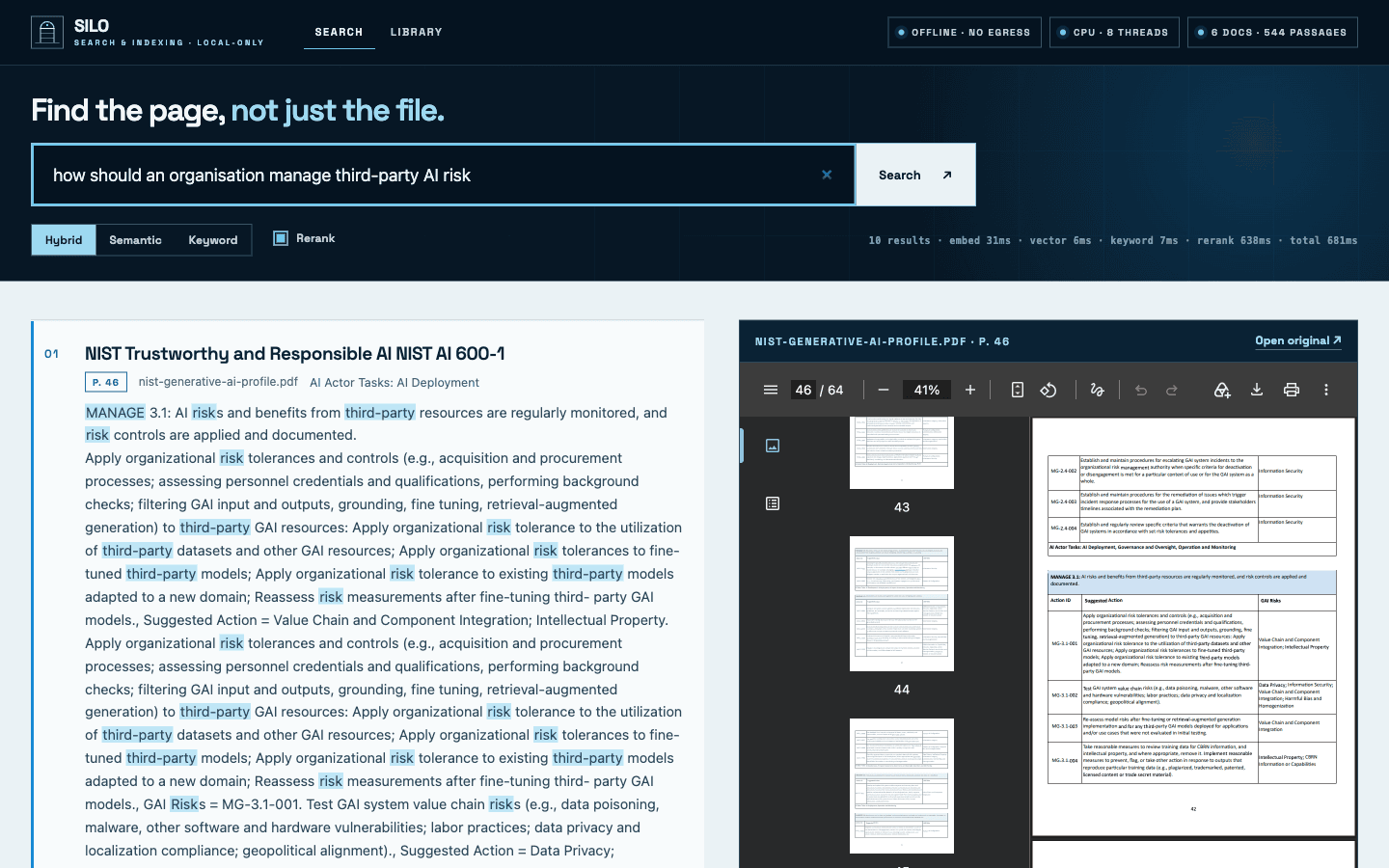
227 pages of NIST guidance. 132 seconds to index on a laptop. Zero outbound network connections, and that last number was enforced by a sandbox, not taken on trust.
Most organisations that want “AI on our documents” run into the same two walls. The documents are contracts, clinical notes, engineering records or board papers, and they are not allowed to leave the building. And the hardware quote for doing it in-house starts with a GPU server.
Both walls are lower than they look. Most of what people ask of a document collection is a retrieval problem: find the passage, show me the page. That part does not need a large language model at all, and the models it does need are small enough to run on the processors already in the rack. So we built the retrieval engine first, made it work with the network removed, and open-sourced it.
What SILO is
SILO stands for Search and Indexing, Local-Only. A data silo is usually a complaint. For documents that must not leave the building, it is the requirement, and the job is to make what is inside easy to find.
- You point it at a folder of PDFs, Word documents, slides, spreadsheets or Markdown.
- It parses and indexes every passage for keyword and semantic search.
- A local web page lets you search in plain language. Every result links to the file, page and section it came from.
- Optionally, a language model writes an answer from those passages, with numbered citations. It can be a model on the same machine or a hosted one. It is off until you turn it on.
- An index is one directory. You can keep several, point SILO at whichever you want, share one read-only, or carry one to another machine.
- A built-in MCP server lets Claude, or any other MCP client, run the searches for you.
The engine is about 2,200 lines of Python under the Apache-2.0 licence. The repository is github.com/parrytechnologies/silo.
How it works
Six stages. Each uses a well-known open-source component, chosen because it runs well without a graphics card.
- 01
Parse
DoclingA layout model finds headings, paragraphs, lists and tables and puts them in reading order. Page numbers survive, which is what makes page-level citations possible later.
- 02
Chunk
Structure-aware, 384 tokensPassages are cut along the document’s own structure, not every N characters, and each one keeps the heading path it sits under.
- 03
Embed
bge-small-en-v1.5A 33-million-parameter model turns each passage into 384 numbers. Quantised, it is a 67 MB file running through ONNX Runtime on the CPU.
- 04
Store
LanceDB + SQLiteAn embedded store holds the vectors and a BM25 keyword index side by side. It is a directory on disk. There is no database server to run.
- 05
Retrieve
BM25 + vectors, fusedKeyword search and semantic search each return their top 50. Reciprocal rank fusion merges the two lists by rank, so their scores never need to be comparable.
- 06
Rerank
MiniLM cross-encoderA 22-million-parameter model reads the query and each of the top 20 passages together and puts them in final order.
Why two kinds of search
Keyword search and semantic search fail in opposite directions, which is why serious retrieval systems run both.
Search the sample corpus for PR.AA-05, a control identifier in the NIST Cybersecurity Framework. The keyword index ranks the right passage first, because the string matches exactly. Embedding models are unreliable with identifiers like that: to them it is an unfamiliar token.
Now ask about a “holiday allowance” in a policy that only ever says “annual leave”. Keyword search finds nothing, because no word matches. Vector search finds it, because the meaning does. One of the tests in the repository checks exactly this case.
SILO shows its working. Each result carries its vector rank, its BM25 rank, the fused score and the rerank score, so when a result surprises you there is something to inspect.
Why these particular parts
- Docling does the unglamorous work that decides everything downstream. A search engine fed a flat text dump of a PDF, with headers, footers and table cells interleaved, will retrieve noise however good the model is.
- Small models, on purpose. The embedding and reranking models total about 150 MB. They run through ONNX Runtime, which is built for CPU inference.
- An embedded store. No vector database server means nothing extra to deploy, patch or secure. Below 100,000 passages the vector scan is exact; above that an approximate index is built automatically.
- No framework. There is no orchestration library between you and the retrieval logic. The fusion step is a dozen lines you can read.
What “air-gapped” means here
It is easy to write “runs offline” in a README. These are the mechanisms behind the claim:
- One command uses the network.
silo models pulldownloads about 900 MB of model files, once, in its own process. You can run it on a different machine and copy the folder across. - Everything else is forced offline. Before any model library loads, SILO sets the switches that make it refuse network access. A missing model becomes a clear local error instead of a quiet download attempt.
- The web page is self-contained. No CDN, no hosted fonts, no analytics. A strict Content-Security-Policy tells the browser to block anything that is not served by the engine itself.
- Telemetry is off in every mode.
Then we tested it rather than asserting it. A script in the repository runs a full index and search inside a macOS sandbox that denies every outbound connection except loopback. We also ran the same cycle in a Linux container started with --network none.
One detail from that work is worth passing on. The first sandbox profile we wrote did not block anything. We only noticed because step one of the script is a control: try to reach the internet, and abort if that succeeds. Without the control, the test would have “passed” while proving nothing. If you verify an air gap, verify the gap first.
What we measured
One run, on an Apple M3 laptop with 8 cores and 16 GB of memory, with inference pinned to the CPU. The corpus was six public PDFs: four NIST frameworks and two research papers.
| Corpus | 6 PDFs · 227 pages · 12.8 MB |
|---|---|
| Indexing, end to end | 132 s (about 1.7 pages per second) |
| Passages indexed | 544 |
| Peak memory while indexing | 3.3 GB |
| Index size on disk | 3.7 MB |
| Query, hybrid without rerank | about 15 ms |
| Query, hybrid with rerank | about 0.6–0.7 s |
| Re-index with nothing changed | under 1 s |
Two honest caveats. These are timings from one machine and one small corpus, not a benchmark. And we have checked retrieval quality with the test suite and by hand, not against a labelled evaluation set. The figure that matters is how well it finds things in your documents, and that has to be measured on your documents.
The practical reading: indexing is a batch job you run overnight, and search is interactive. Reranking costs about half a second per query on a laptop; turn it off and results arrive in tens of milliseconds, at some cost in ordering.
Run it yourself
You need Python 3.11 or newer, uv, about 2.5 GB of disk and 4 GB of free memory.
git clone https://github.com/parrytechnologies/silo.git
cd silo
uv sync                              # install, CPU-only
uv run silo models pull           # the one online step, ~900 MB
./scripts/fetch-sample-corpus.sh     # optional: six public PDFs
uv run silo index sample-corpus   # or a folder of your own
uv run silo serve                 # open http://127.0.0.1:8321
Indexing is incremental. Run the same command again and only new or changed files are parsed; files you deleted leave the index. Scanned documents need --ocr, which is slower and off by default.
To check the machine is ready to be disconnected:
$ uv run silo doctor
 ok    document parsing model on disk
 ok    embeddings model on disk: BAAI/bge-small-en-v1.5
 ok    reranking model on disk: Xenova/ms-marco-MiniLM-L-6-v2
 ok    model libraries forced offline (HF_HUB_OFFLINE=1)
 ok    inference device: cpu · 8 threads
 ok    LLM: not configured — no component makes outbound requests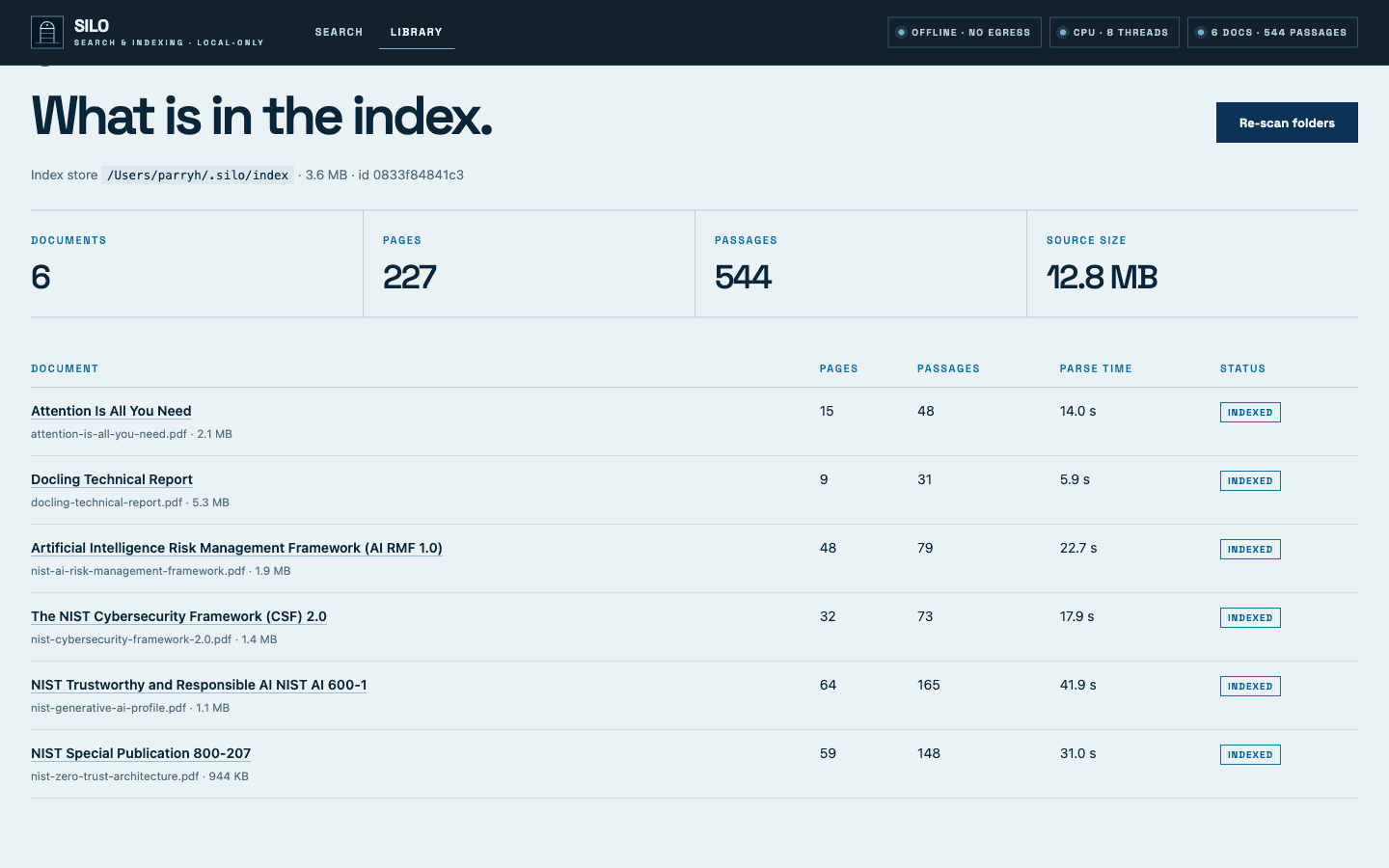
Adding a language model, carefully
Search is useful alone. A language model adds a written answer on top of the same retrieval. SILO talks to any endpoint that speaks the OpenAI chat protocol, which covers Ollama, llama.cpp and vLLM on your own hardware as well as hosted providers.
export SILO_LLM_BASE_URL=http://localhost:11434/v1   # Ollama on this machine
export SILO_LLM_MODEL=gemma4:e2b
uv run silo ask "What are the tenets of zero trust?"
Only the question and a handful of retrieved passages are sent, never whole documents. SILO classifies the endpoint as loopback, private network or external, and says so in the interface. If passages are going to leave your network, that should be a visible decision, not a default.
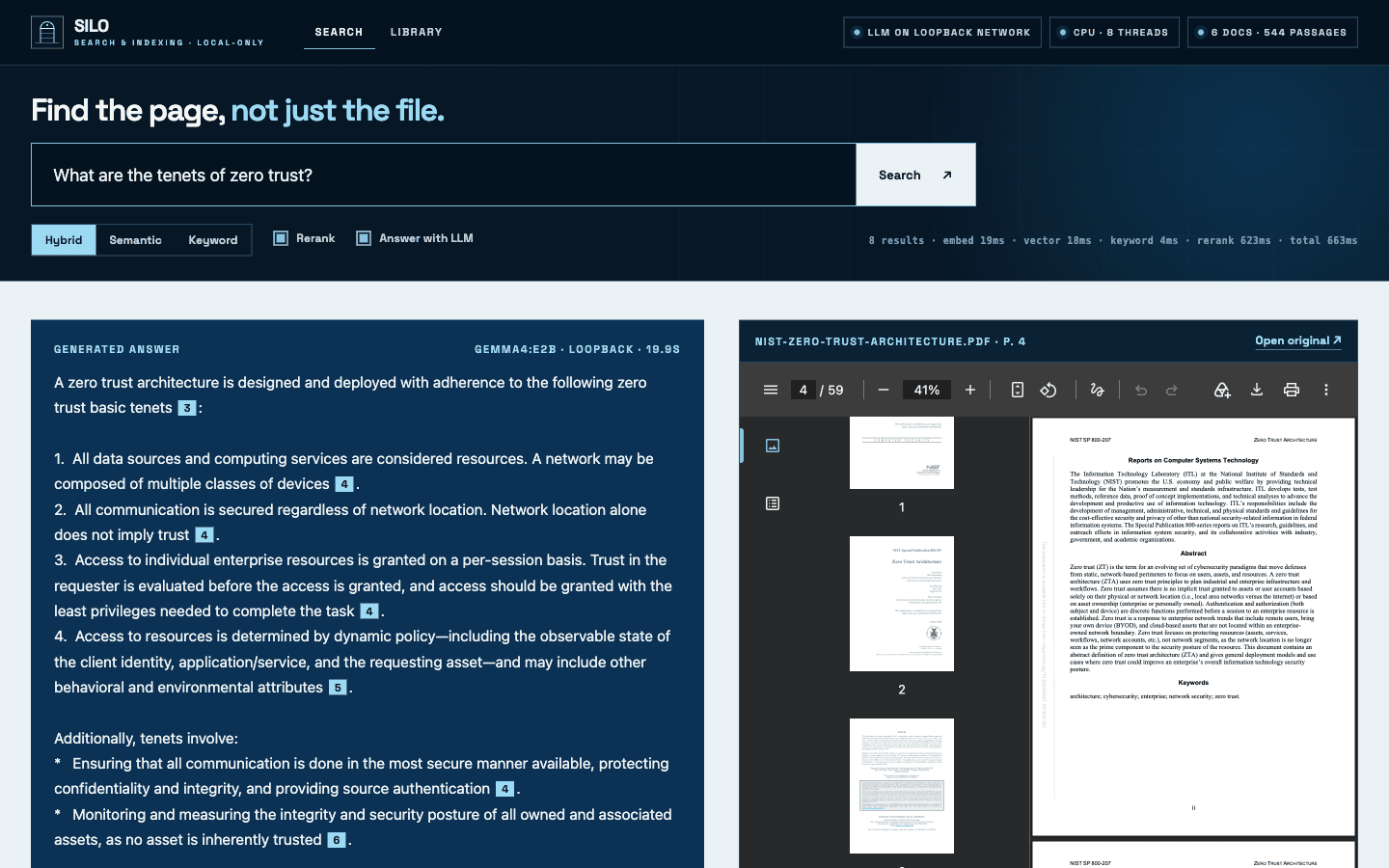
The most useful thing we learned here had nothing to do with model size. Asked for the tenets of zero trust, a small local model first replied that the passages “do not list them”. Retrieval had found the right page. The trouble was that the list was split across three passages, and we handed them over in relevance order: items 4 to 5, then 1 to 3, then 6 to 7. Sorting passages back into reading order before sending them fixed it, with the same model.
Two cautions. The retrieval stack is CPU-only, but a language model is a separate and heavier component, and runtimes may use hardware you did not ask for: Ollama on Apple Silicon uses the built-in GPU by default. And a generated answer is a summary, not a source. The citation is there so someone can check the page.
An index you can pick up and move
Everything SILO derives from your documents lives in one directory: the passages, their vectors, the keyword index and a small catalogue. We call it an index store, and it is deliberately portable.
silo index ~/contracts --index ~/stores/contracts       # a separate store per collection
silo search "notice period" --index ~/stores/contracts  # use it for one command
silo store use /Volumes/team/silo-index --read-only     # or make a shared one the default
silo store relocate /srv/documents ~/Documents/contracts   # same files, different path
Three details make this work in practice. A store records which embedding model built it, and SILO uses that model when it opens the store, so an index built on one machine can be searched on another without matching settings by hand. Search still works when the original files are absent, because the store holds the extracted text; you get the passage instead of the PDF. And read-only mode opens the catalogue with the database’s read-only flag and refuses every write, so a store on a team drive cannot be changed by the people reading it.
One warning belongs next to that convenience. A store is not an access boundary. Anyone who can read the directory can read every passage in it. Split stores by audience, and treat a store with the same care as the documents it came from.
Let Claude drive
Search boxes assume you know what to type. An assistant can do better: try three phrasings, notice that a result refers to an earlier section, go and read it, then answer. SILO supports that through the Model Context Protocol. One command, silo mcp, exposes the index as five read-only tools: search, read around a result, read a document in order, list documents, and describe the index.
# Claude Code
claude mcp add silo -- /absolute/path/to/silo/.venv/bin/silo mcp

# Claude Desktop: Settings → Developer → Edit Config
{ "mcpServers": { "silo": { "command": "/absolute/path/to/silo/.venv/bin/silo", "args": ["mcp"] } } }
We tested it the way it would be used. Claude Code, given only the SILO tools, was asked what control PR.AA-05 requires and where that is written. It ran one search in keyword mode, the right choice for an identifier, and answered with the requirement, the file and page 25.
This is the one place where the air-gap promise depends on your choice. The MCP server opens no network connections and cannot modify the index. But the passages it returns are read by the client, and with Claude that means they are sent to Anthropic as part of the conversation. Often that is exactly the trade people want: the assistant sees the few passages it asked for, not the document store. It is not air-gapped, and the documentation says so before the setup instructions. For a closed network, use the built-in search, a local model, or an MCP client that runs one.
What the engine leaves out, on purpose
SILO binds to 127.0.0.1 and trusts whoever can reach it. It has no sign-in, no per-document permissions and no multi-user isolation. That is a deliberate boundary. Those things depend on each organisation’s directory, file permissions and network, and they are where internal search tools go wrong: a search box that ignores access rules is the easiest way to read files you cannot open.
So the split is this. The engine is open, and you can run it today on one machine, including on a schedule: the repository has a cron example. The layer around it is the work we do with organisations, on their own infrastructure:
- Single sign-on and search that respects who may see which documents.
- Connectors and scheduled indexing for file shares, SharePoint or a document management system.
- Index stores per team or sensitivity level, kept current centrally, and assistant access over MCP that respects the same rules.
- Multi-user serving, with TLS, audit logs, backups and monitoring.
- Choosing, sizing and hosting a language model, locally or otherwise.
- An evaluation built from your own documents and real questions, so quality is measured before anyone relies on it.
Because the core is open source, none of it is a black box, and there is no licence to be locked into.
Try it, then tell us where it breaks
The fastest way to judge this is to run it on a folder you know well and search for something you know is in there. If it fails, the result panel shows which retriever missed, and an issue on the repository with that detail is the most useful feedback we can get.
A question for anyone who already runs document search inside a restricted network: what broke first for you, the parsing, the permissions, or people’s trust in the answers?
Run the engine.
Or have us deploy it.
The code is free to use. If you want it running for a team on your own infrastructure, with access control and a language model, we can help.